Home Network
If the Internet Is Down
Before doing anything else, check whether it's actually your internet or just one device. If one phone or computer can't connect but others can, the problem is that device, not the network.
If nothing in the house has internet:
- Unplug both the modem and the router.
- Wait 30 seconds.
- Plug the modem back in and wait at least 2 minutes for a steady green light.
- Plug in the router and wait an additional 2 minutes before testing.
Any time the router is unplugged, Home Assistant must also be restarted.
See Home Assistant.
The WiFi Password
Network name: LewisNetwork
Password: 8B655305AE
If a Phone Won't Connect
- Toggle Airplane mode off, then back on.
- Toggle Airplane mode on, restart the phone, then turn Airplane mode off.
- Forget the LewisNetwork in your WiFi settings, restart the phone, and reconnect using the password above.
Full Network Reset
Only do this if the quick fix above didn't work, or if Grant has asked you to.
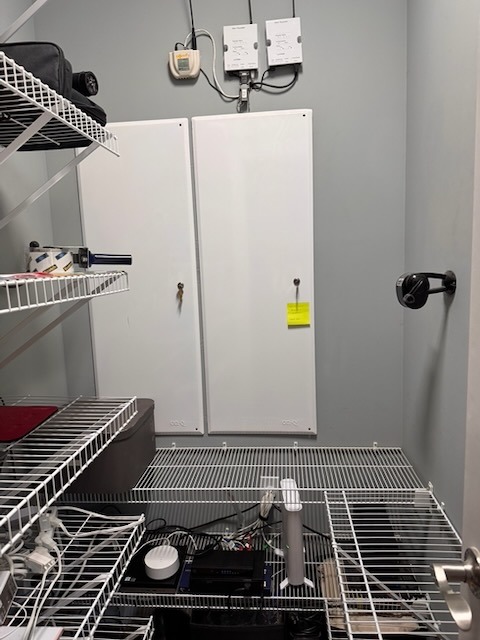
This requires going into the network closet.
The network closet has two tall metal panels. The left panel holds the OmniPro II. The right panel holds the Lutron RadioRA 2 equipment and various networking equipment and cabling. Refer to the photos below.
Power everything OFF in this order:
- Access points (WiFi). Open the right panel. Find the middle keystone block —
the three cables with small white labels below them (① Family Room, ② Office, ③ Upstairs).
Disconnect those three cables.
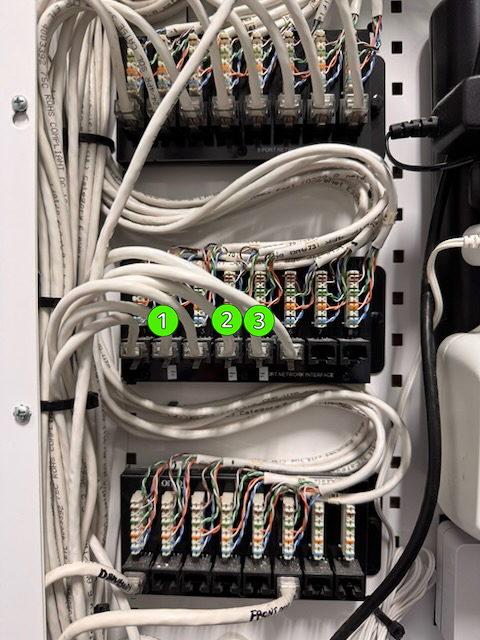
① Jack 2 — Family Room AP · ② Jack 4 — Office AP · ③ Jack 5 — Upstairs AP - EliteDesk PC. Press the power button on the EliteDesk (bottom shelf).
It will shut down gracefully.
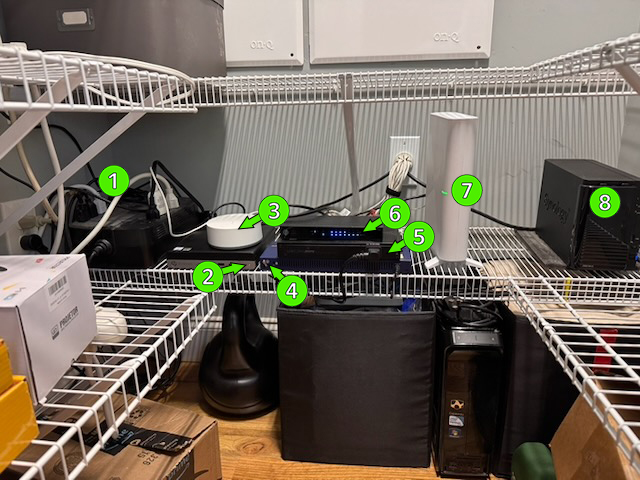
Device ② on the bottom shelf. See the shelf image further down this page.
- OmniPro II. Open the left panel.
(a) Pull the small red cable off the battery terminal.
(b) Pull up on the pink zip tie to unplug the A/C adapter.
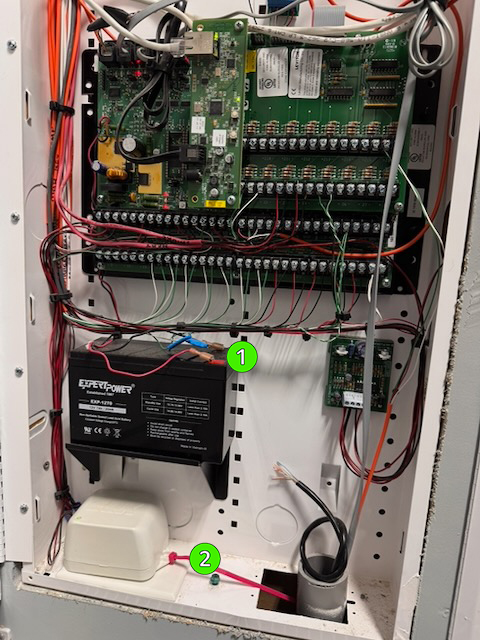
① Red battery cable · ② Pink zip tie / A/C adapter - Lutron RA2. Open the right panel and press the red button on the power strip in the upper right of the cabinet.
- Router. Unplug it (bottom shelf).
Device ⑤ on the bottom shelf. See the shelf image further down this page.
- Modem. Unplug its power cable (bottom shelf).
Device ⑦ on the bottom shelf. See the shelf image further down this page.
Power everything back ON in this order:
- Modem. Wait for a solid green light before continuing.
- Router. Wait 2 minutes.
- EliteDesk PC. Press the power button.
- OmniPro II. Reconnect the A/C adapter (pink zip tie), then reconnect the red battery cable.
- Lutron RA2. Press the red button again on the same power strip.
- Access points. Reconnect the three Ethernet cables to the middle keystone block.
- Home Assistant. Once everything is back up, open the Home Assistant app on your phone and restart Home Assistant. See Home Assistant.
The bottom shelf for reference: